
3.2.1. General Settings
- Trim: Remove artifact segments
- Norm (Normalize): Normalize amplitude
3.2.2. Signal Processing 1 (upper graph, green)
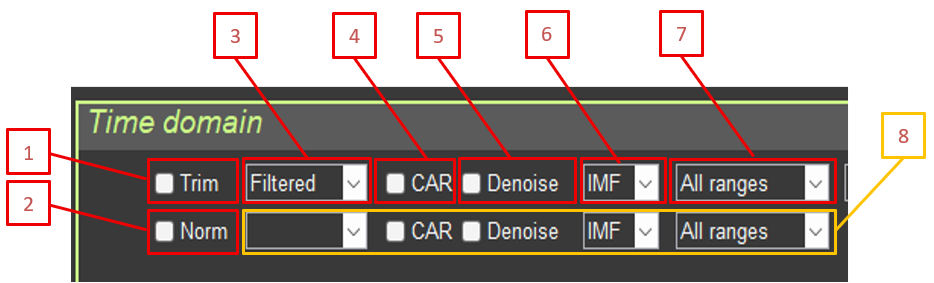
- Type: RAW / Filtered (if no value is selected for signal 2, signal 2 is not shown)
- CAR: Common average reference
- Denoise: Blink artifact suppression
- IMF: EMD mode selection
- Filter: Frequency filter selection
- Signal 2 controls: if no value is selected in Type for signal 2 (RAW / Filtered), signal 2 is not shown
3.2.3. Signal Processing 2 (lower graph, red)
The same parameters as for signal 1.
3.2.4. Additional Parameters
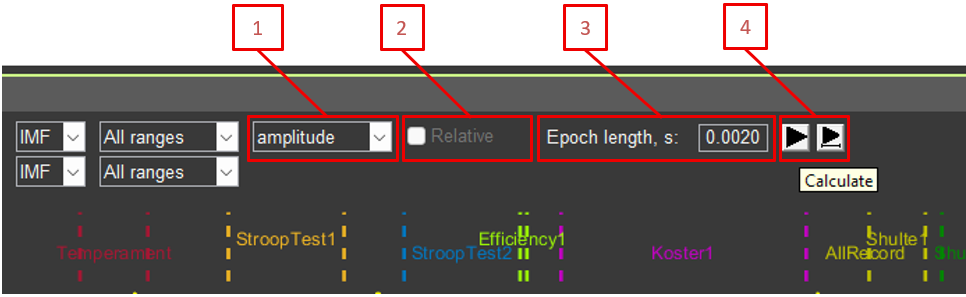
- Amplitude/Power: Display amplitude or power
- Relative: Relative or absolute values for signal power
- Epoch length: Epoch length for averaging (in seconds)
- Recalculation buttons (left button returns graph scaling to 100%; right button keeps the same signal fragment)
3.2.5. Electrode Selection
Checkboxes for showing or hiding the following channels:
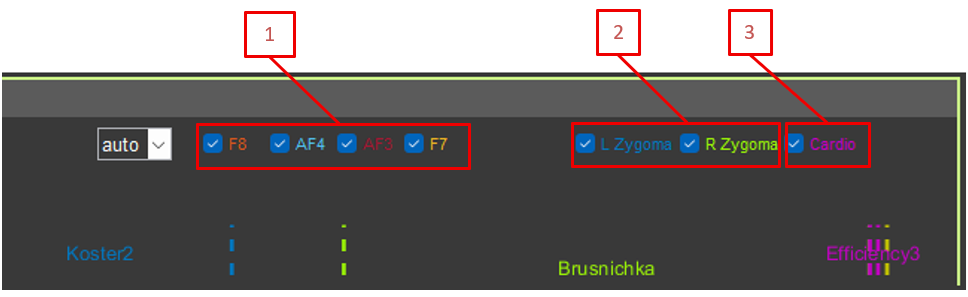
- F8, AF4, AF3, F7 (EEG)
- L Zygoma, R Zygoma (EMG)
- Cardio (ECG)
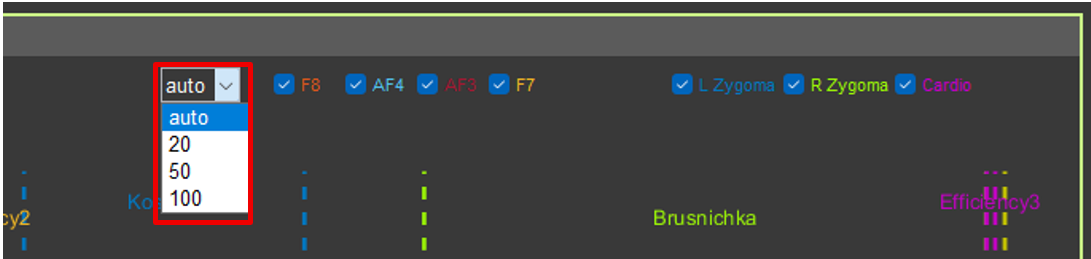
3.2.6. EEG Scale
Drop-down list for setting a fixed Y-axis scale for EEG channels (auto, 20, 50, 100 µV).